A new update has been released, you can view the full changes on our blog post.
https://sbox.game/news/update-26-09-29
Game Jam: Final Four

Roundabout has been eliminated and earns 5th place for £5000.
Four finalists remain, the next round of votes is now open.
Citizen 2.0
I've updated the citizen. They now have a default non frowny face and they can have a neck.
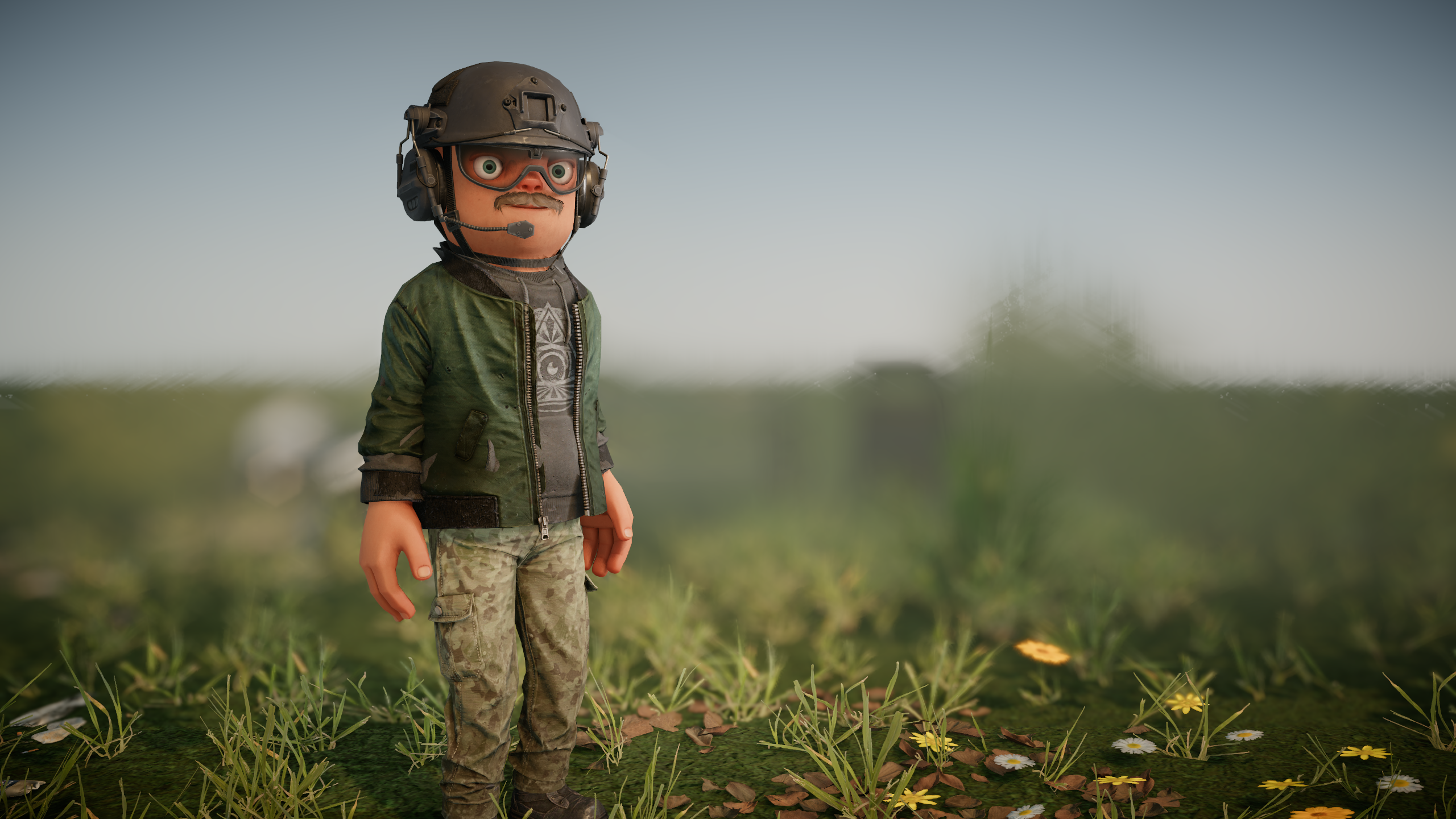
We have sliders to alter other aspects of the body like their chest, waist, neck, and nose size. You can choose their eye colour too. So if you liked having no neck, you can bring that back with a slider.
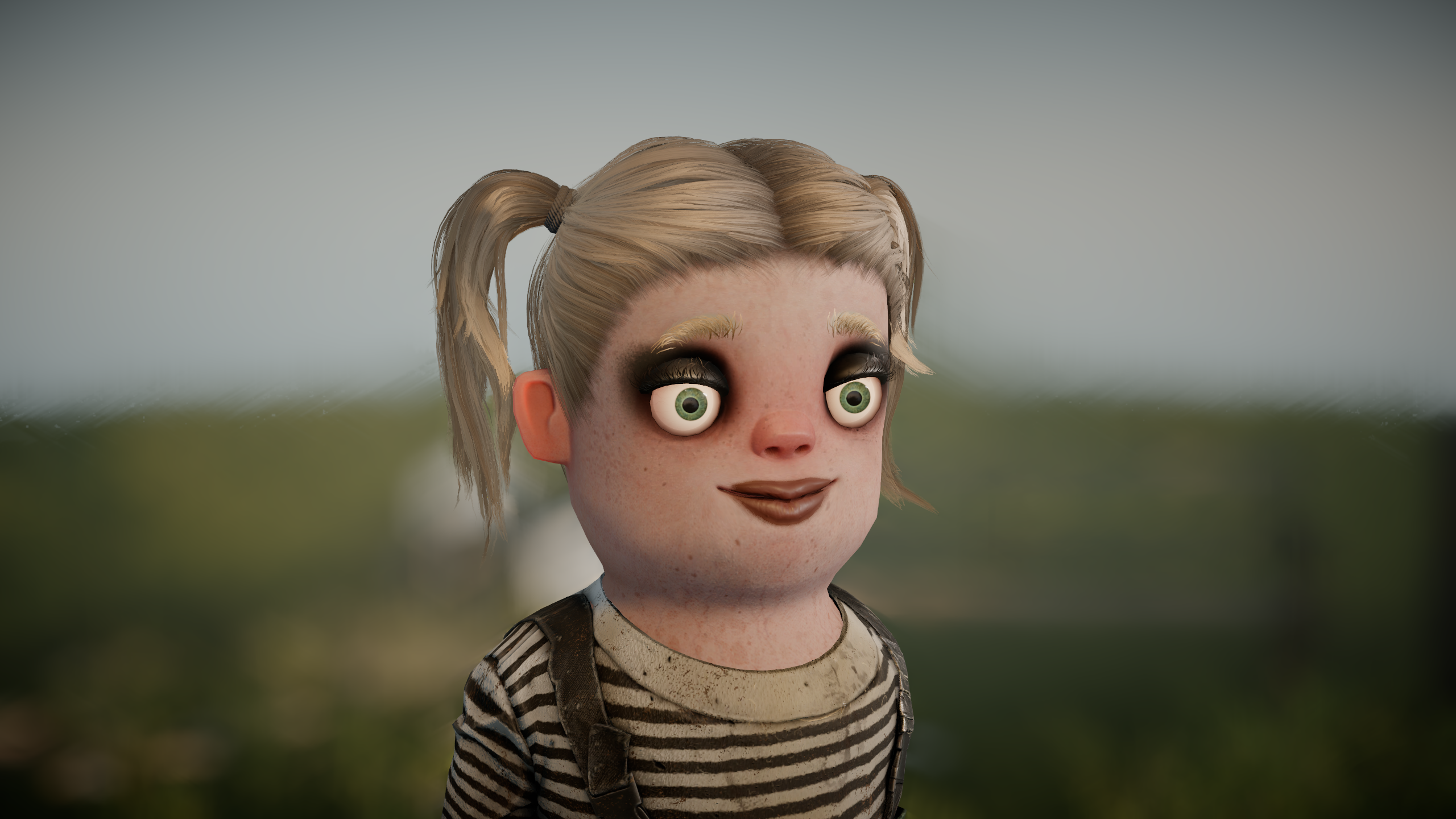
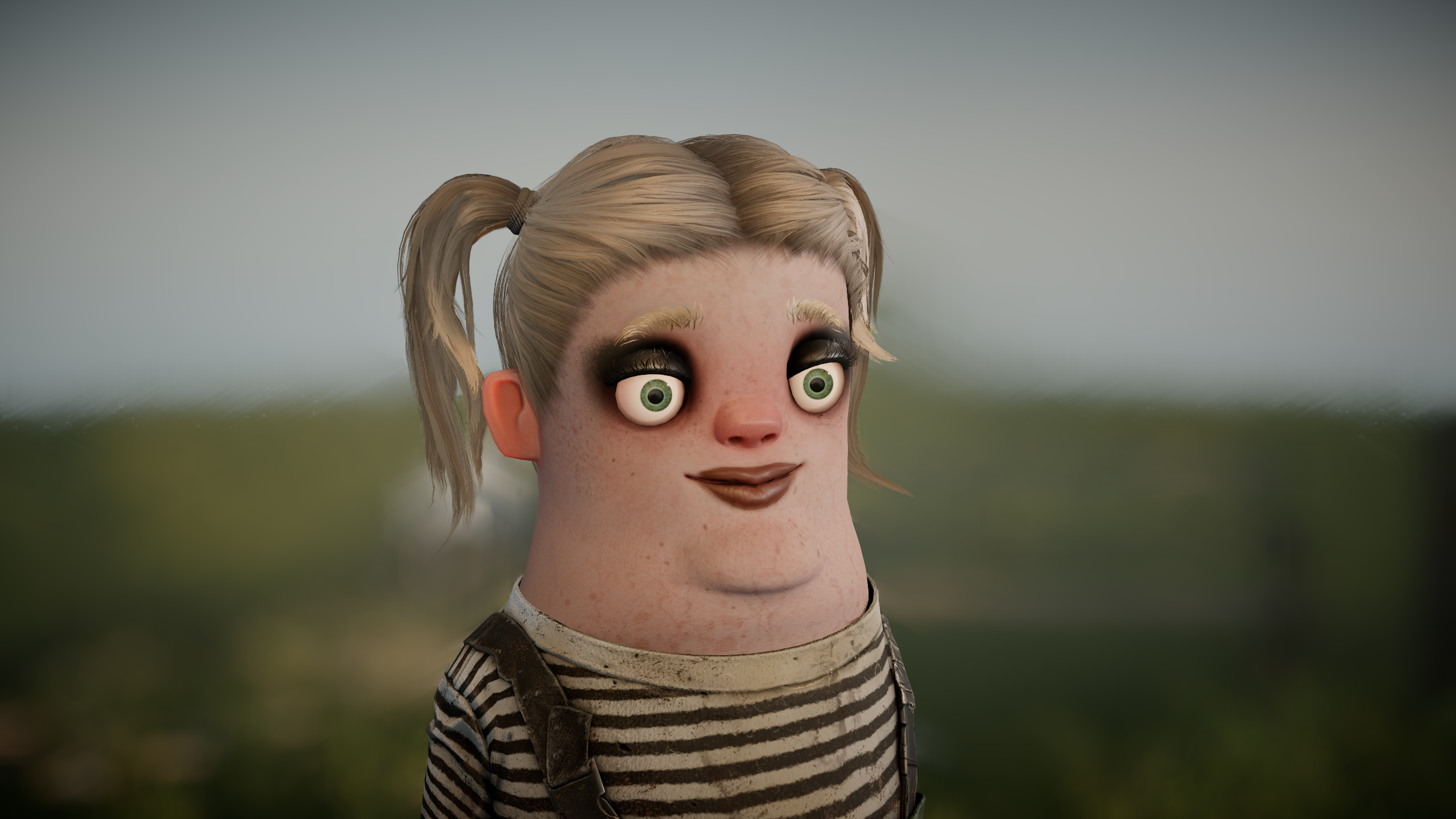
Let me be honest here. I love the citizen, I love how he looks, I love that he has no neck. But the feedback we've consistently got is that people hate them. They hate everything about them. So we're going to fidget around and change things to see if we can change that.
We're going to keep trying to make it work a bit longer, we're going to keep tweaking and trying to get it less divisive, but at some point we might have to hold our hands up and say okay, yeah, it didn't work, and flush him down the toilet and have a generic humanoid instead.
Of course, this isn't what "fixes" s&box on its own, but it something that comes up consistently in our many many many negative reviews, so it's something that we are addressing along with all the other feedback we receive.
Model Deform
You can now reshape a model with a `ModelDeformer` component. Add one as a child of a model, use its volume to choose the affected area, and inflate, squash, stretch, transform, pull or project that part of the mesh. Deformers can be stacked with an explicit priority to control their order.
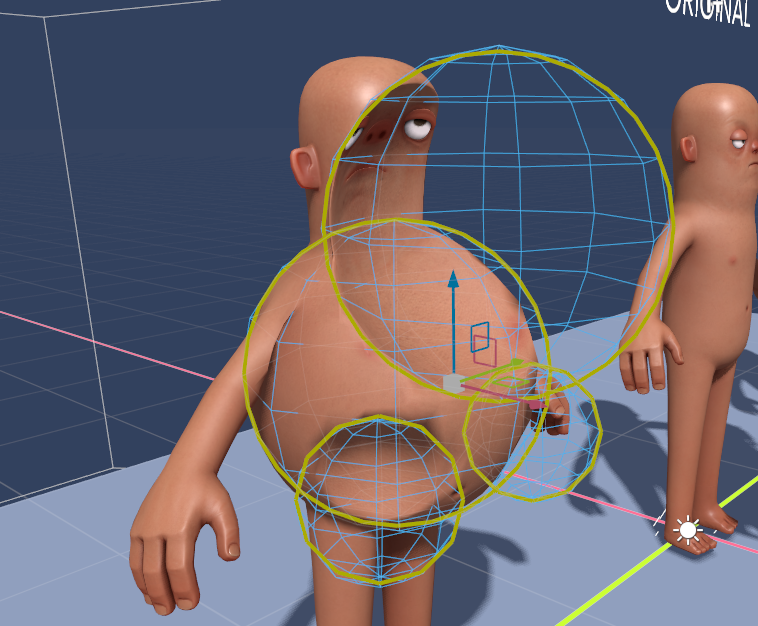
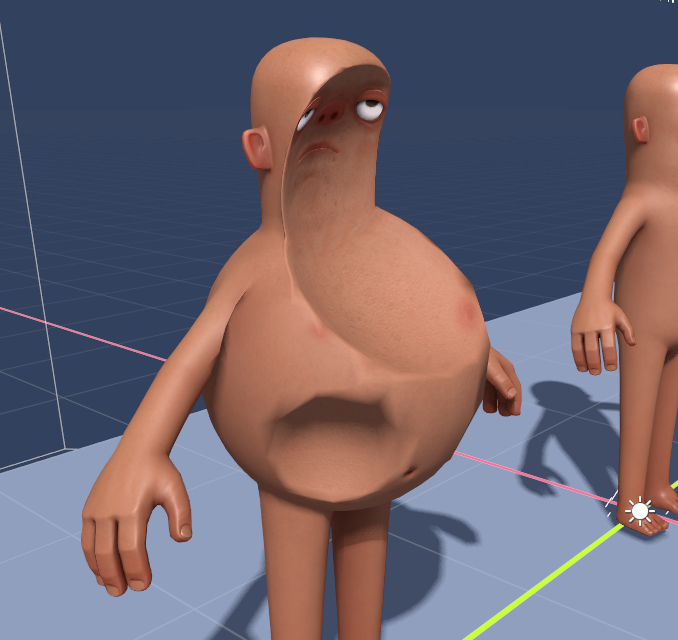
These are all GPU, they're shit hot fast, and can apply to any model. They are purely visual - they're not going to change the positions of bones or hitboxes or collision data.
This is what gives Citizen 2.0 its neck and new body-shape controls, but it can also be used for your own characters and effects.
Friends and Parties
We've moved some stuff around, and moved the friends list so it's all up in your face on the right side of the main menu. We want to make it as simple as possible for you to invite your friends, and see what they're up to.
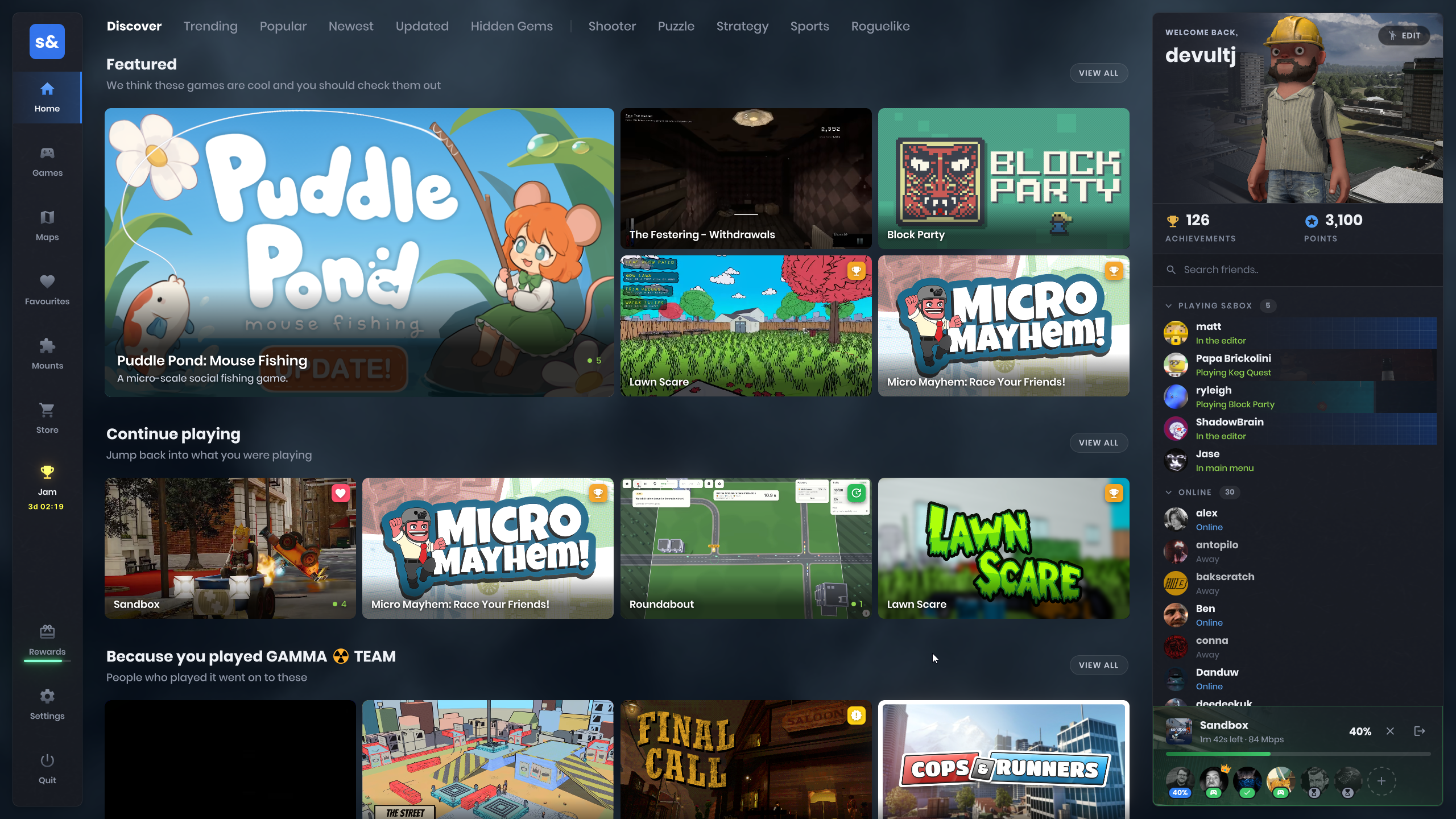
All party controls show up at the bottom right of your screen now. It'll be clearer as to what's going on, if everyone's downloaded a game, or if you're waiting for the host. These party controls stay on-screen on other pages, including overlays!
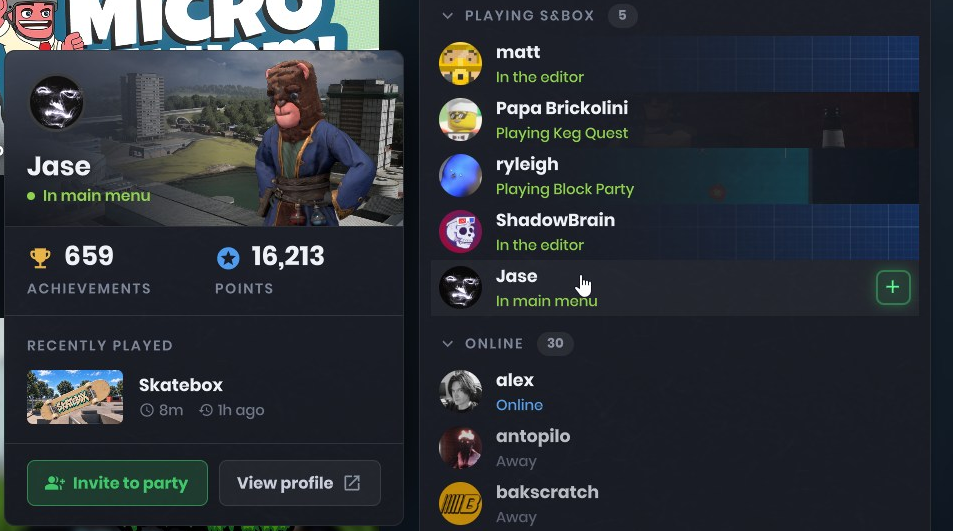
We've also added a new player card, that shows when you click on one of your friends. It shows their avatar too!
Game Overview Refresh
We've refreshed the game overview screen. A lot of info that players didn't care for is now gone, but we've also added some new stuff that will make finding games that are suitable for your party much easier.

The latest update for a game is also visible at a glance. We encourage creators on the platform to use this feature, as it's useful to show players what's new and what to expect.
Loading Screen Refresh
The loading screen's looking dated, so we've refreshed that too. It'll show a game's last update for you to read a blurb for, as well as show you how many achievements you've unlocked.
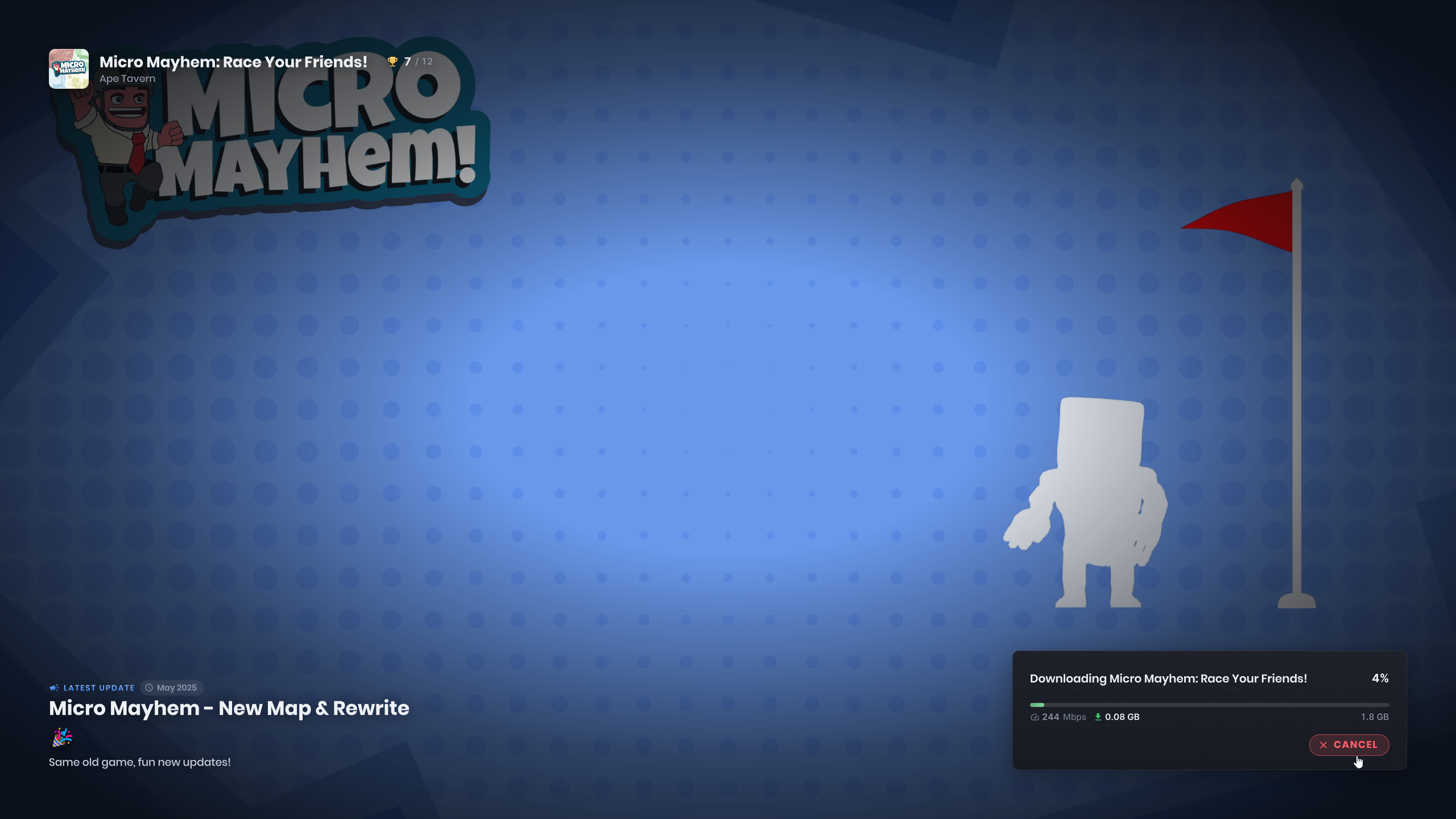
When opening the loading screen, you'd notice stuff got stuck on-screen while everything was warming up. That is also fixed, so things will feel smoother going forward.
Main Menu Music
The main menu has a new music track from Carson. And if you don't like that I've also added a separate menu music volume setting, so you can turn it down or off independently of the rest of the audio.
Voice Chat Settings
Voice chat now uses SDL for microphone capture and Opus for compression. You can select your microphone directly in the in-game audio settings, with a live meter to help set the voice activation threshold.
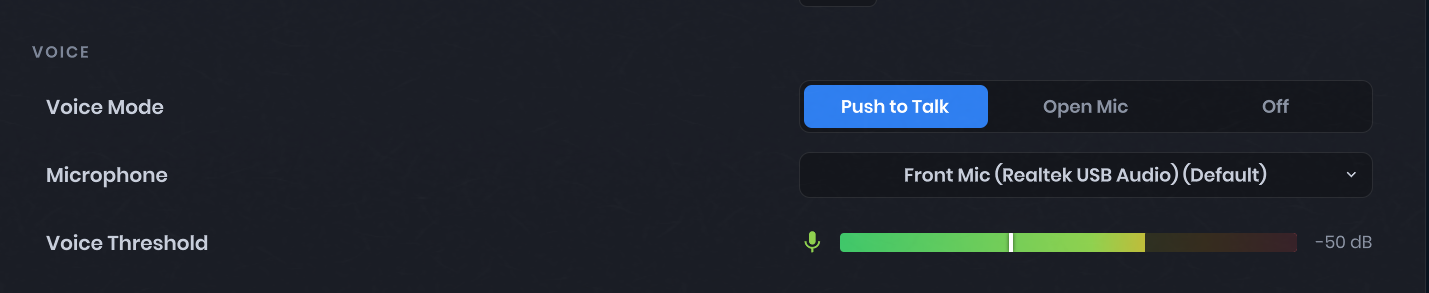
This also fixes garbled voice when running multiple instances of the game. Each playback stream now owns its decoder, and custom voice playback can use SoundStream.WriteVoiceData.
New Startup Screen
New startup screen for the game with a progress bar.

GPU Profiling Scopes for Command Lists

You can now add your own profiling scopes inside command lists. They will be visible from in-game GPU profiler (`overlay_gpu 1`) and external tools. This should be useful for measuring performance cost of specific sections of your rendering code.
This is how you can add a profiling scope:
static readonly ProfilingSampler MyProfilingScope = new( "My Profiling Scope" );
// inside the command list execution code: using ( _commandList.ProfileScope( MyProfilingScope ) ) { // do something here... }
Nested scopes work as well, like on the screenshot above. Here's a setup example for it:
using ( _commandList.ProfileScope( ParentScope ) ) { using ( _commandList.ProfileScope( NestedScopeA ) ) { // something here... }
using ( _commandList.ProfileScope( NestedScopeB ) ) { // something here.... } }
These code snippets are also available in s&box docs.
Clutter Optimizations
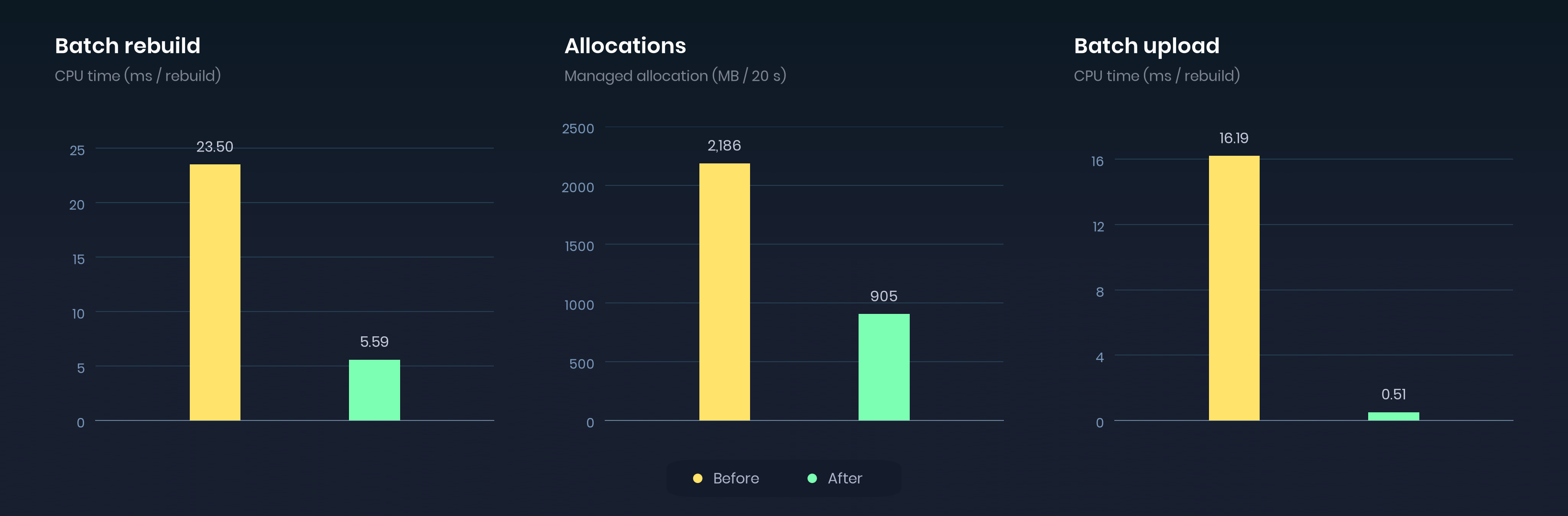
We've optimized a lot the clutter scatterer to use less memory, less stutters and overall performances.
On our benchmark scene, we reduced memory allocations by 58% and a 97% reduction in batch upload time.
Scene Compilation
You can now compile scene meshes and models into combined static geometry and collision using Scene > Compile Scene. This is similar to the map compiling in hammer, another step closer to bringing map editing over to the scene editor.
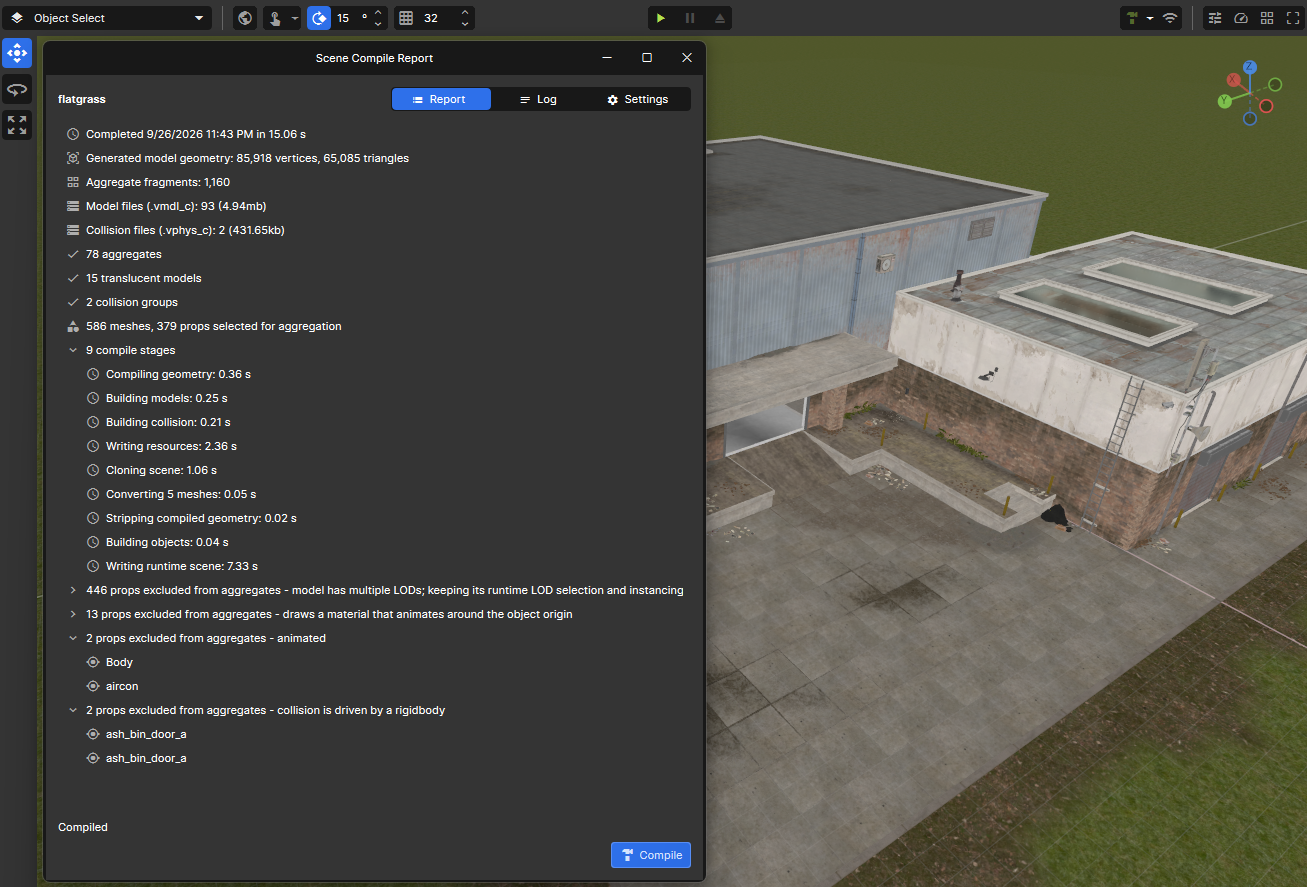
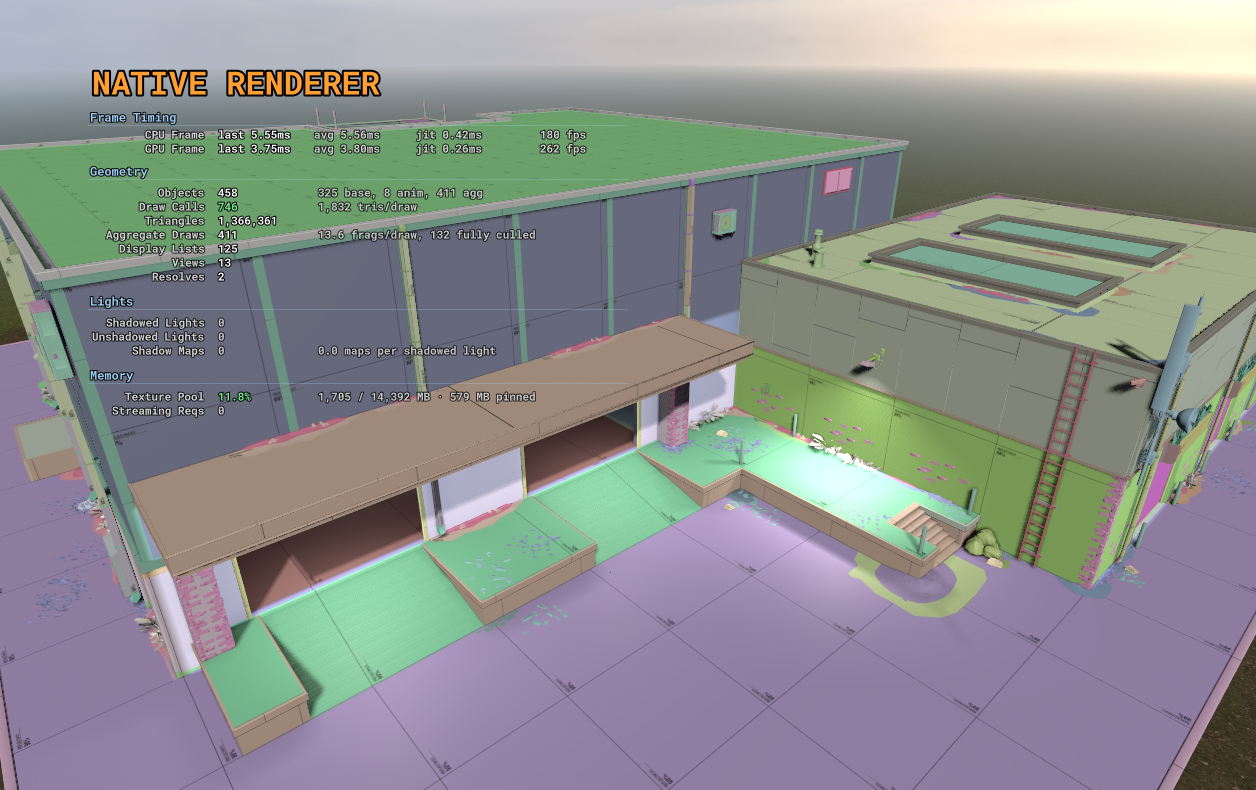
You should see a good reduction in draw calls if your scene has a lot of meshes.
Depth of Field Improvements
Depth of field now has a focus picker: click an object in the scene to set the focus instead of finding the distance by trial and error. The focal-distance and range controls have also been expanded for larger scenes.
Blur size now scales relative to a 1080p render target, so changing resolution keeps the effect a consistent size. We have also fixed bright HDR pixels leaking through rejected depth-of-field samples.
Faster Game Loading
The longer it takes to get into a game, the more players give up before they see it, so we spent some time getting them in faster.
Downloads
Downloads used to run through the main thread, so on a fast connection they were partly capped by frame rate. They now run on the thread pool, and dependencies download in parallel instead of one after another.
Cherry picked from our benchmarks:
- On average hardware with a 200 Mbit/s connection, a game with lots of small files downloads about 50% faster
- Games with lots of other package dependencies benefit the most, one went from 19.4s to 6.6s
- The faster your connection the bigger the gain, slow connections were already mostly network bound
Loading
Most of the load time was spent on overhead rather than the actual loading:
- Files were mounted one at a time
- Package dlls were downloaded again on every load
- Backend calls waited on each other instead of running in parallel
Loading sandbox on flatgrass:
- Cold load (first load after starting s&box): ~20s to ~9s
- Warm load (loading it again in the same session): ~7s to ~5.5s
Faster Painter Drawing
I optimized the Painter system. Now drawing Polygons and Polylines is now much much faster and doesn't create any garbage.
Rendering Stability
We have fixed several causes of GPU crashes, including depth-normal work on some AMD cards, cubemap filtering, render input layouts, and cleanup when maps unload or the renderer shuts down.
There are also fixes for replacing DLSS upscalers and initializing or sharing FSR3 upscalers. When VRAM is over budget, the texture pool now shrinks by the amount it is over, including in tools. GPU crash reports include more information about the failing call, shader and memory budget to help track down remaining problems.
Database Service
We've had a database service on the backend for a while but not really exposed it. Well now it's exposed via `Sandbox.Services.Database`. There are a million ways you can use this and I'm sure we'll expand on it in the future.
This allows you to save data in a database for your package, on the backend. The data persists between sessions obviously, and can be public or private. You can get all entries for a particular group etc.
var messages = Database.GetTable( "player-messages" );
// The message and its world position. var data = Json.Serialize( new { Text = "That chest has teeth.", Position = new Vector3( 120, 450, 32 ) } );
await messages.Create( Guid.NewGuid().ToString(), data, "dungeon-01", true );
var records = await messages.List( "dungeon-01" );
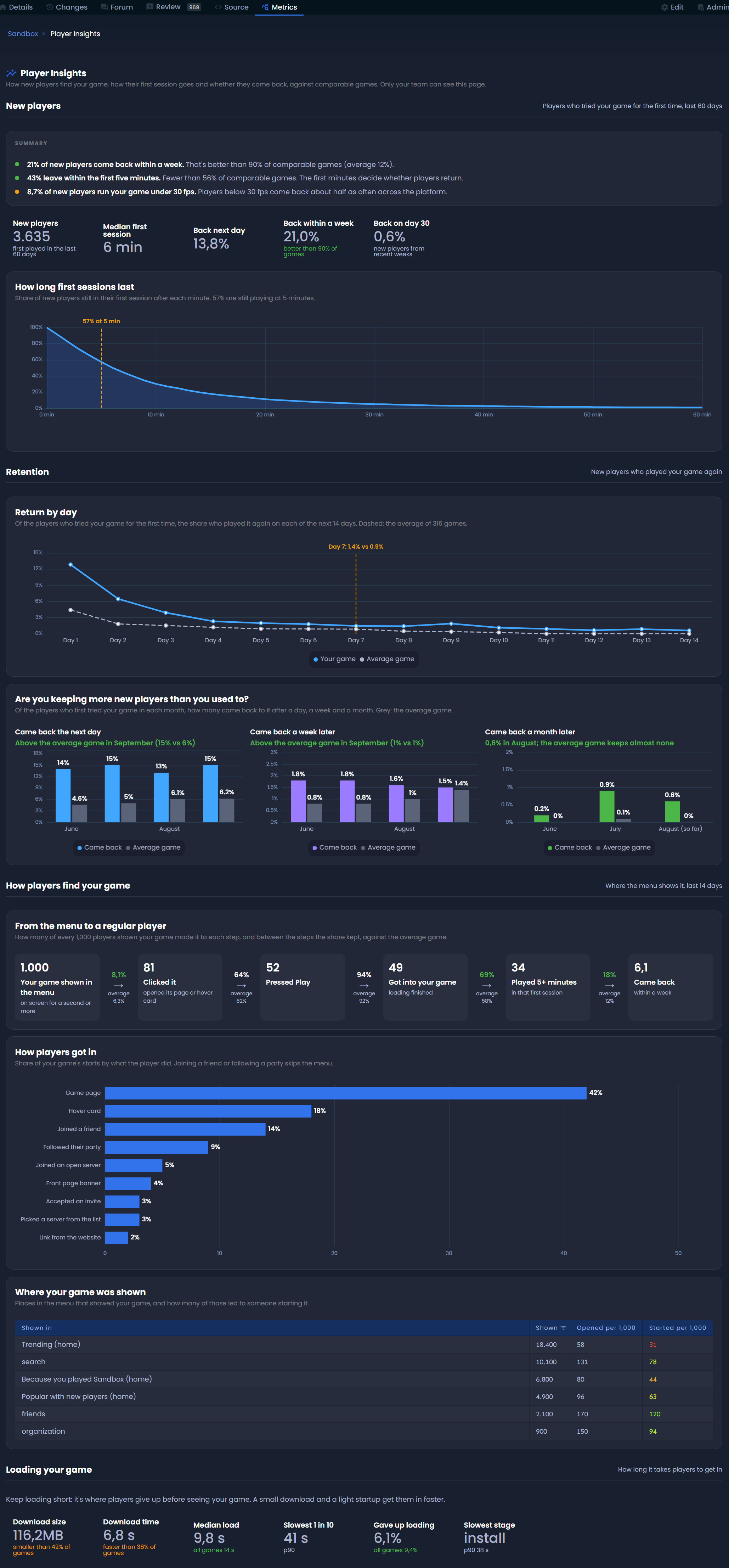
Player Insights for Game Creators
There's a new player insights page under your game's metrics, at `sbox.game/<your-org>/<your-game>/metrics/player-insights`. Only members of the game's organization can see it.
It focuses on two topics:
Player Retention
- How long players stay during their first session
- How many come back the next day, a week later and a month later
- Whether that's getting better or worse over time
Discovery & Onboarding
- Where the menu showed your game and how players got in
- Whether the thumbnail, description and video convince them to press play
- Whether the first 5 minutes keep them engaged
There's also a small section on loading, since a big download or slow startup is where players give up before they've seen anything.
Everything is compared against similar games, so you can tell whether your numbers are actually good.
Game Metadata Moved from the Web to the Editor
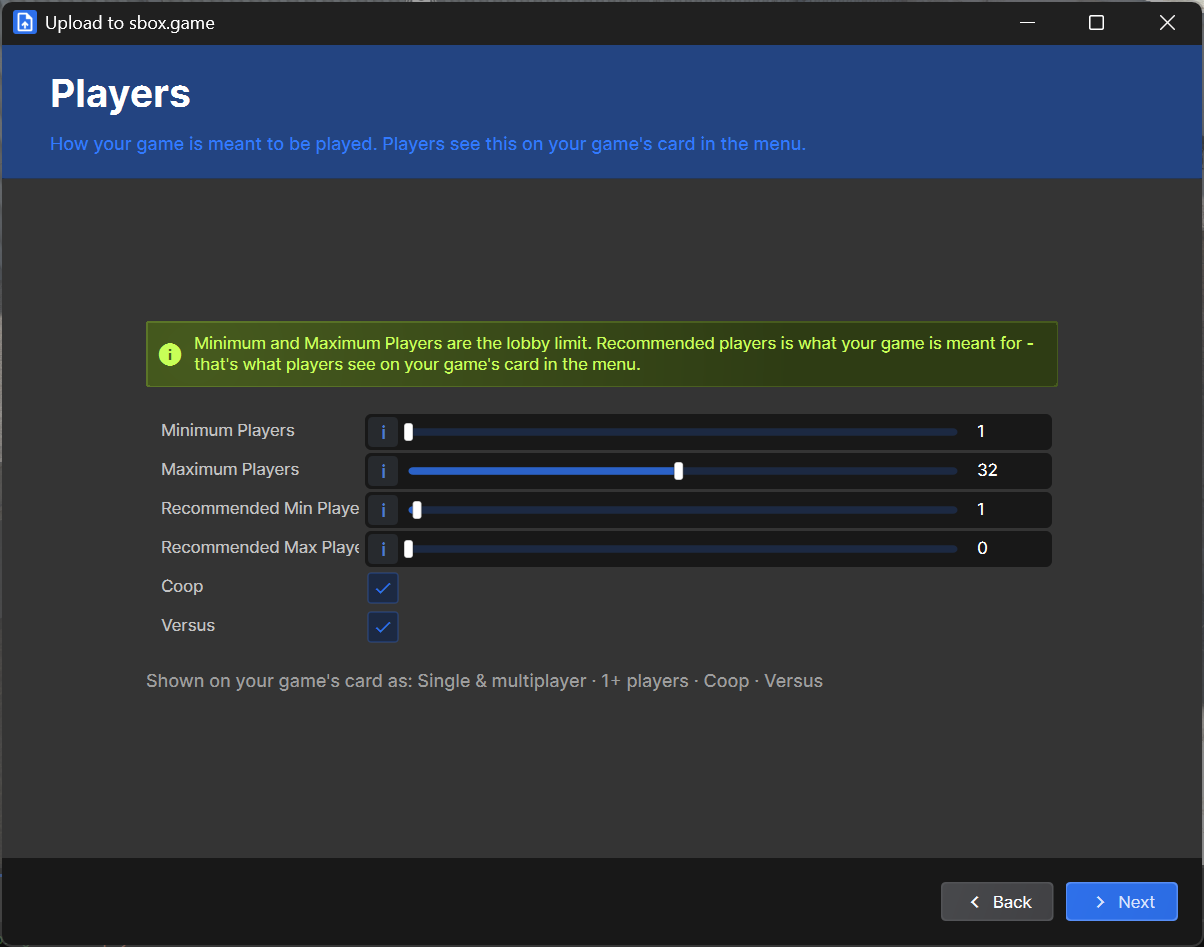
Player count, co-op/versus and map settings have moved from the website into project settings and the publish wizard. Players should see which games they can play alone or with their party, and that only works if every game has this information set. So the publish wizard now asks for it.
Terrain Rendering Fixes
Terrain holes and outer edges are now clipped before pixel shading. This restores early depth rejection and lets MSAA smooth the cut edges, while avoiding shader work on terrain that will be discarded.
We also fixed the terrain depth prepass writing incorrect surface data. It now outputs the proper normals and roughness, restoring ambient occlusion on terrain.
Changelog
🎁 Added
Characters & Models
- Citizen 2.0 - refreshed the default face, added shader-based eyes with editable color, and added neck, head, chest, waist, nose and chin adjustments facepunch/sbox PR #5909 by @garrynewman
- Model Deformer - added volume-masked inflate, squash/stretch, transform, pull and project operations with ordered stacking and inspector controls facepunch/sbox PR #5894 by @garrynewman
Editor
- Scene compile reports - added Make All Static on non-static exclusion groups, marking the affected objects static in one undoable edit facepunch/sbox@f83dad0 by @aylaylay
- Game settings - edit recommended player counts, co-op/versus modes and map settings in Project Settings; the publish wizard now includes a Players step with a game-card preview facepunch/sbox@38113fd by @lolleko
- Scene compilation - explicitly bake eligible static meshes and props into aggregate geometry and collision with Scene > Compile Scene, retaining the scene path, GUID and editable source facepunch/sbox PR #5590 by @aylaylay
- Component eyedropper - choose from a dropdown when the picked object has multiple matching components facepunch/sbox PR #5921 by @bakscratch
- Edge cuts - create a single vertex with a single-point edge cut facepunch/sbox PR #5923 by @bakscratch
- Depth-of-field focus picker - click a scene target to set the focal distance, with expanded distance and range controls facepunch/sbox PR #5874 by @antopilo
Rendering & Shaders
- Managed scene renderer - added the opt-in C# scene renderer through r_managed_scene 1; disabled by default facepunch/sbox@37baa6c by @handsomematt
- Renderer comparisons - added SceneLab parity/benchmark tooling and r_managed_scene_compare for comparing managed and native rendering facepunch/sbox@37baa6c by @handsomematt
- Command-list profiling - added nested GPU scopes through CommandList.ProfileScope, visible in overlay_gpu and external profiling tools facepunch/sbox PR #5807 by @wheatleymf
- ViewSetup controls - added RenderTags, ExcludeTags, EnableUI and EnableDebugOverlays facepunch/sbox PR #5891 by @garrynewman
Audio
- Menu music volume - added a separate setting for the main-menu music level facepunch/sbox@7554054 by @garrynewman
- Microphone settings - added in-game input-device selection and a live voice-activation threshold meter using SDL capture and Opus facepunch/sbox PR #5915 by @devultj
- Voice playback - added SoundStream.WriteVoiceData with a separate decoder per stream facepunch/sbox PR #5915 by @devultj
Main Menu & Parties
- Friend cards - view citizen avatars, achievement scores and current/recent games from the refreshed friends rail facepunch/sbox PR #5927 by @devultj
- Game jam voting - added live voting bars, finalists and standings screens for the next jam phase facepunch/sbox PR #5903facepunch/sbox PR #5899 by @garrynewman
Services
- Database service - added Sandbox.Services.Database for package-scoped, player-owned cloud records, with public/private visibility, groups, pagination and revision-checked updates facepunch/sbox@95bc339 by @garrynewman
🧼 Improved
Main Menu & Parties
- Loading status - display Loading Scene before the synchronous scene load begins facepunch/sbox@d424788 by @lolleko
- Startup screen - added a coloured Facepunch logo, blue background and loading progress bar facepunch/sbox PR #5935 by @garrynewman
- Party dock - replaced the footer party deck with a floating party/join-status overlay that stays accessible in modal views facepunch/sbox PR #5927 by @devultj
- Jam browsing - show live nomination counts on game cards, entry counts on filter tabs and active-player sorting facepunch/sbox PR #5899 by @garrynewman
- Menu suspension - preserve the menu scene, navigation and scroll state while pausing its updates, rendering and spatial audio during games facepunch/sbox PR #5904 by @garrynewman
- Frame-rate defaults - game and main-menu frame-rate caps now default to uncapped facepunch/sbox@bc2e016 by @garrynewman
Downloads & Networking
- Map prefetching - fetch the selected map and its dependencies alongside the game package so later mounting can use cached files facepunch/sbox@4381b9f by @lolleko
- Assembly caching - reuse package DLLs from the asset download cache after validating their checksum facepunch/sbox@5d7ca72 by @lolleko
- Shared downloads - reuse in-flight package-info requests and manifest downloads across concurrent callers facepunch/sbox@e5ac631 by @lolleko
- Cached asset mounting - resolve cached package files off the main thread and update mounted-symlink resource mappings in a parallel batch facepunch/sbox@1f65e0efacepunch/sbox@7f393d7 by @lolleko
- Achievement loading - start games without waiting for the achievement list and queue early manual unlocks until it arrives facepunch/sbox@64dfc02 by @lolleko
- Load-step pacing - yield a frame between loading steps instead of adding fixed delays facepunch/sbox@34a1d7d by @lolleko
- Package transfers - download files off the main thread and mount completed files on the main thread facepunch/sbox@e9ac2ef by @lolleko
- Dependency downloads - prefetch package dependencies in parallel facepunch/sbox@9f2077f by @lolleko
- Party preloading - cache the game and its dependencies without mounting them until joining facepunch/sbox@2e462b8 by @lolleko
- Download handling - retry stalled downloads and accept compressed responses facepunch/sbox@badce7f by @lolleko
- Network files - avoid redundant filesystem lookups when preparing files for transfer facepunch/sbox@cb9298f by @handsomematt
Navigation
- Disconnected targets - avoid exhaustive searches when the destination is on another navmesh island and return a partial route toward it facepunch/sbox@d1ff911 by @lolleko
- Agent routes - repair existing routes when agents drift or are repositioned instead of always replanning facepunch/sbox@f18fd6f by @lolleko
UI & CSS
- Painter - reduce CPU submission work and temporary allocations for paths, lines, curves, polygons and aligned strokes, with reusable batch storage and shared contours facepunch/sbox PR #5866 by @garrynewman
Rendering & Shaders
- Terrain clipping - cut holes and heightmap boundaries before pixel shading, restoring early depth rejection and MSAA on cut edges facepunch/sbox PR #5930 by @sampavlovic
- Clutter - reduced scatterer allocations, batch rebuild work and GPU batch upload time facepunch/sbox PR #5887 by @antopilo
- Terrain culling - reuse meshlet culling results across passes of the same view facepunch/sbox@1d77bb4 by @handsomematt
- Camera hooks - reuse the render-stage delegate instead of allocating one per camera per frame facepunch/sbox@980dc78 by @handsomematt
- VRAM budget - shrink the texture pool by the full budget overshoot, including in tools facepunch/sbox@b23702c by @lolleko
- GPU diagnostics - tag crashes with GPU vendor, failing call, fault type, shader and VRAM-budget information facepunch/sbox@5ba7ed5facepunch/sbox@e95bd0c by @lolleko
Platform
- Load diagnostics - record teardown, reset and scene-loading stages and log the duration of each load stage facepunch/sbox@dc78677 by @lolleko
- Session diagnostics - report menu discovery, game-load timings and session end reasons facepunch/sbox@8c5d138 by @lolleko
Audio
- Menu soundtrack - replaced the menu music with a new track from Carson facepunch/sbox@7554054 by @garrynewman, @carsonkompon
Characters & Models
- Citizen eyes - reduced the size of the new eyeballs facepunch/sbox@1873c45 by @garrynewman
Editor
- Scene compile snapshots - build from an isolated copy of the saved scene so later editor changes do not alter the captured job facepunch/sbox@72cb1d1 by @aylaylay
- Scene compile work - build models, collision and aggregate data in single passes and avoid repeated mesh scanning facepunch/sbox@9f47646facepunch/sbox@6835ca1facepunch/sbox@11af099facepunch/sbox@d582fba by @aylaylay
- Compile status - show when edits need compiling and use the editable scene for editor play until it is compiled again facepunch/sbox@def6fb2facepunch/sbox@63be38e by @aylaylay
- Scene publication - publish compiled scenes and their runtime dependencies through ordinary resource handling facepunch/sbox@87df9c7 by @aylaylay
🪛 Fixed
Editor
- Deleted scene output - recreate missing compiled scene files from an existing bake, or fall back to editable source when generated bake data is missing facepunch/sbox@505742d by @aylaylay
- Scene compile reports - keep reports available while there are unsaved changes so multiple exclusion groups can be fixed before saving facepunch/sbox@9d09054 by @aylaylay
- Source-less scene status - handle scenes without local source files when checking compile status facepunch/sbox@7d49ad5 by @aylaylay
- Prefab compile settings - only read scene bake settings from local scene assets, avoiding prefab compile errors facepunch/sbox@5823f8f by @aylaylay
- Camera piloting - correct framing guides when desktop scaling is not 1 facepunch/sbox PR #5883 by @metapyziks
- Multi-object editing - stop copying embedded-resource values from the first selected object into the others facepunch/sbox PR #5898 by @carsonkompon
- Undo - preserve bone identity when undoing object changes facepunch/sbox PR #5892 by @aylaylay
- Scene compilation - support cloud assets without requiring their source files facepunch/sbox PR #5924 by @aylaylay
- Edge tools - correct open-edge indicator alignment and scaling facepunch/sbox PR #5922 by @bakscratch
Main Menu & Parties
- Friend invites - clicking Invite no longer opens the friend popup and gives clearer feedback facepunch/sbox PR #5886 by @devultj
- Pause menu - keep footer buttons visible facepunch/sbox PR #5886 by @devultj
- News images - do not stretch HtmlPanel images by default facepunch/sbox PR #5886 by @devultj
- Jam voting - keep voting snapshots fresh and prevent listener failures from turning successful votes into errors facepunch/sbox PR #5899 by @garrynewman
UI & CSS
- Filtered text - fixed text compositing in UI masks and filters facepunch/sbox PR #5853 by @xezno
- Bound values - ensure initial values with a hash of -1 are synchronized into controls facepunch/sbox@bc2e016 by @garrynewman
Rendering & Shaders
- Terrain ambient occlusion - write correct normals and roughness in the terrain prepass instead of invalid G-buffer data facepunch/sbox PR #5930 by @sampavlovic
- Editor environment maps - apply the isolated cubemap view-rendering scope in the editor as well as in game facepunch/sbox PR #5929 by @sampavlovic
- Camera rendering - avoid holding the camera lock during RenderToTexture and fix CameraComponent command-list races facepunch/sbox PR #5889 by @garrynewman
- Depth of field - scale blur size relative to 1080p so its apparent size stays consistent across resolutions facepunch/sbox PR #5882 by @sampavlovic
- Depth-of-field highlights - fix bright HDR pixels leaking through rejected samples facepunch/sbox PR #5876 by @sampavlovic
- AMD depth normals - fixed crashes affecting SSR and other effects using depth normals on some AMD GPUs facepunch/sbox PR #5901 by @sampavlovic
- Sprites and text - correct bounds for non-billboard sprites and sorting between TextRenderer and SpriteRenderer facepunch/sbox PR #5897 by @carsonkompon
- Material cache - evict destroyed materials and replace dead wrappers instead of returning them for reused native addresses facepunch/sbox@f1b2fd8 by @handsomematt
- SceneObject model lookup - avoid crashing when an object has no mesh data facepunch/sbox@070ab3a by @handsomematt
- SceneObject transforms - read transforms of native-created objects correctly and update child transforms when their parent moves facepunch/sbox@4e43b77facepunch/sbox@cafd5d5 by @handsomematt
- Dynamic input layouts - synchronize first-use layout construction so render jobs cannot use partially built layouts facepunch/sbox@142f9fc by @handsomematt
- Cubemap filter initialization - create the filter shader before rendering rather than inside a render-stage callback facepunch/sbox@0fc2e3e by @handsomematt
- Cubemap rendering - isolate cubemap view rendering and fix filtering GPU crashes by avoiding scratch memory and reducing thread-group sizes facepunch/sbox PR #5911 by @sampavlovic
- Async compute synchronization - graphics-queue semaphore waits now cover every stage that can read compute results facepunch/sbox@d204677 by @handsomematt
- Input-layout collisions - fixed heap corruption when input layouts collide facepunch/sbox@173ac32 by @wheatleymf
- Vulkan UAV slots - correctly size UAV bookkeeping so slot 8 cannot overwrite the push-constant buffer facepunch/sbox@c6cd590 by @lolleko
- DLSS replacement - reference-count NGX initialization so retiring an upscaler cannot shut it down beneath its replacement facepunch/sbox@06439d1 by @lolleko
- FSR3 stability - initialize scratch memory and prevent dispatch through uninitialized or concurrently used temporal upscalers facepunch/sbox@4fc5380 by @lolleko
- Map unload - clear lighting references before deleting world objects that may render for one final frame facepunch/sbox PR #5932 by @sampavlovic
- Renderer shutdown - release leftover GPU fences before destroying their owning render thread facepunch/sbox PR #5932 by @sampavlovic
Audio
- Voice chat - fixed garbled audio with multiple running game instances by separating voice playback decoders facepunch/sbox PR #5915 by @devultj
- Audio device lifetime - keep SDL audio initialized while a device still owns an audio stream facepunch/sbox@5892816 by @lolleko
Engine
- Assembly access checks - reject assemblies declaring IgnoresAccessChecksToAttribute facepunch/sbox@5ba6aa3 by @lolleko
- Geometry helpers - fixed closest-point calculations on zero-length lines facepunch/sbox PR #5894 by @garrynewman
Downloads & Networking
- Manifest failures - allow a failed manifest download to be retried instead of leaving an empty manifest cached as a successful result facepunch/sbox@e5ac631 by @lolleko
- Server browser - share and refresh Steam discovery requests to avoid false empty server lists after repeated queries; use the running Steam AppID for standalone games too facepunch/sbox-public #11869facepunch/sbox PR #5907 by @garrynewman
Services
- Package statistics - resolve the calling package from compiler-written assembly metadata instead of its assembly name facepunch/sbox@95bc339 by @garrynewman
🚯 Removed
Main Menu & Parties
- News card - removed the main-menu news card as part of the friends rail refresh; news remains in the launcher facepunch/sbox PR #5927 by @devultj
Editor
- Compile on save - removed automatic geometry baking on save; use Compile Scene explicitly facepunch/sbox@e53e34e by @aylaylay
- Detached compile history - scene compile reports now follow the active scene instead of retaining detached historical reports facepunch/sbox@4e30b1f by @aylaylay
Posted by the game’s developer or publisher to its Steam community hub and published by Valve through Steam’s public news API. Sifter reproduces it unedited and writes none of it.