Welcome, Galactic Survivalist!
Even though version 1.19.5 was released not too long ago, we’re already kicking off the (pre-)experimental phase for 1.20 today.
The reason: Starting now, you can use an instance directly within the Survival game to enter Creative mode, where you can work on blueprints—either alone or with others—to use them later in the game. And you can do all of this WITHOUT having to leave the server or start a new game!
To ensure this new feature can be thoroughly tested, we’ve opened a server with the “Invaders vs. Defenders” scenario.
Eleon Game Studios - Official EXPERIMENTAL Server
Once you’ve joined, you’ll find two portals. One creates a separate instance for your faction so you can craft together (as a player faction). The other creates a “public” instance that any player can enter.
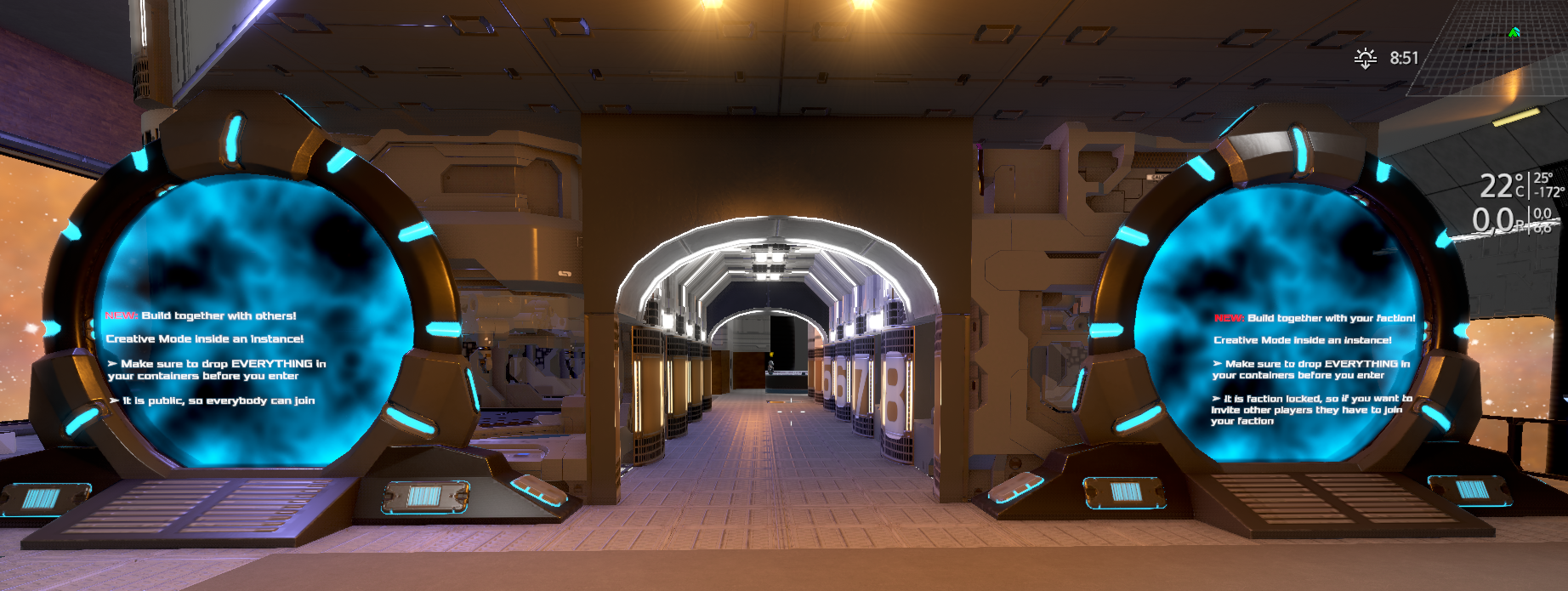
However, you can ONLY enter the Creative instances if you have no items in your inventory. If you leave the Creative instance, all items you placed inside the instance will be removed from your inventory.
Tips for Playing in the Instance (especially for new players)
- You can press the H key to open a window where you can put all the necessary building blocks and items into your inventory.
- In the instance, you don’t need to eat, and you can’t take damage.
- You have infinite jetpack like in normal Creative mode
In general, Creative mode in the instance works exactly the same as the Creative game you can select from the start menu.
Limitations / Known Issues
- It’s possible that not ALL features from the local Creative mode are available. These will be added later and included in an upcoming update. You can find more details in the changelog below. There you’ll also find configuration options if you want to create such an instance yourself.
- Creative Mode instances in Space are coming soon
- Godmode in such instance will come soon. This not only allows you to walk through solid blocks, but also lets you move freely in all directions (without a jetpack).
As always, we welcome your feedback. Please use the following subforum for this purpose: https://empyriononline.com/threads/v1-20-creative-mode-instances.103163/
To report bugs:
https://empyriononline.com/forums/bugs.34/
We hope you have fun trying it out!
Changelog: v1.20 Build 5204
Changes:
With Creative Mode instances now live in the experimental build, here is the full technical guide on how to set up, configure, and customize these playfields using playfield.yaml and BlocksConfig.ecf. From securing inventory isolation to using new instance flags and block properties, all details are broken down below.
Creative Build Lot
Creative building together in multiplayer, without switching the game mode. A guide for content creators and modders - no code involved, everything is set in playfield.yaml and BlocksConfig.ecf. State: 2026-09-24.
1. Setting up a lot
Add these lines to the Instance: block of the playfield's playfield.yaml:
Instance:
CreativeMode: true # creative build functions
Time: 0 # never ends
InstancePerFaction: true # one lot per faction
EnterWithNoInventoryNoArmor: true # nothing comes in, no armor either
LeaveWithEmptyInventory: true # nothing goes out (incl. armor)
DropInventory: true # logout / respawn outside: the backpack stays inside
RestrictToOrigin: 255 # optional, 255 = everybody
Mandatory: EnterWithNoInventoryNoArmor and LeaveWithEmptyInventory. Together they keep items and armor from the creative menu inside the lot. The game writes a warning to the log when a CreativeMode playfield lacks one of them. EnterWithEmptyInventory is not needed next to them (it is the weaker check).
Also needed: a portal outside that targets the lot and a portal inside that leads back. Worth offering next to the outside portal: a locker, so players can empty their inventory first. Pick a friendly playfield: O2, food, temperature and fall damage still follow the game mode.
2. Instance flags
All flags work for every instance, not only for a lot.
The entry checks also apply when a player re-enters their own running instance (before, leaving, filling the bag and walking back in skipped the check).
3. What changes inside a lot
4. Block property UsableInCreativeInstance
UsableInCreativeInstance: false in BlocksConfig.ecf stops a block from being used in a lot (F key, control panel, logistics, context menu). Placing it, spawning a blueprint with it and pasting it stay allowed - the lot limits using, not building. Set by default on ATM, TradingStation, NPCTrader, NPCDialogue and Teleporter blocks. The property is inherited along Ref. POI blocks that are already part of the playfield are covered as well.
5. Dialogue API for instance tickets
Every player has at most 5 instance tickets; an unlimited instance takes one like any other. A dialogue can list them and give one up:
int GetInstanceTicketCount() // running instances the player has a ticket for string GetInstanceTicketName(index) // playfield name, "(Unlimited runtime instance)" appended bool ClearInstanceTicket(index) // frees the slot for this player only; the instance // keeps running. False for the instance the player is in
After ClearInstanceTicket the next entry into a normal instance creates a new, empty one. With InstancePerFaction the player gets the faction's instance again.
6. Good to know
- Armor from a lot is deleted on logout or lost connection, not dropped. Nobody can bring their own in, so only armor from the creative menu is lost.
- Joining or leaving a faction switches to another lot; the old one stays on disk.
- Personal containers keep their content per structure and position - what is stored in the lot stays there. - InstancePerFaction with Time > 0: after the end the faction gets the old instance back, not a fresh one.
- Teleporter blocks in a normal instance bypass LeaveWithEmptyInventory (only the portal checks it). In a lot teleporters cannot be used.
Fixes:
- fix Updated POI (removed/replaced blast doors; Thx to Stellar_Titan)
- fix Hecken: Adv.Component factory had wrong zone trader
- fix Hecken Orbit: Moved Shipyard a bit further away from the atmosphere
- fix Malformed Techtree setup: Drone Bay spawner now correctly unlocks from Cargo parent
Posted by the game’s developer or publisher to its Steam community hub and published by Valve through Steam’s public news API. Sifter reproduces it unedited and writes none of it.